Skip to content

Work/Adobe

01 · Adobe · Platform + AI · 2019–2026

Helping 250M+ people a year solve problems on their own

I led Adobe Help as a product for seven years: the strategy, the roadmap, and the organization behind an experience with 400M+ visits a year. The goal was resolution: customers solving their own problems without needing support. In 2026, self-resolution became Help’s primary measure.

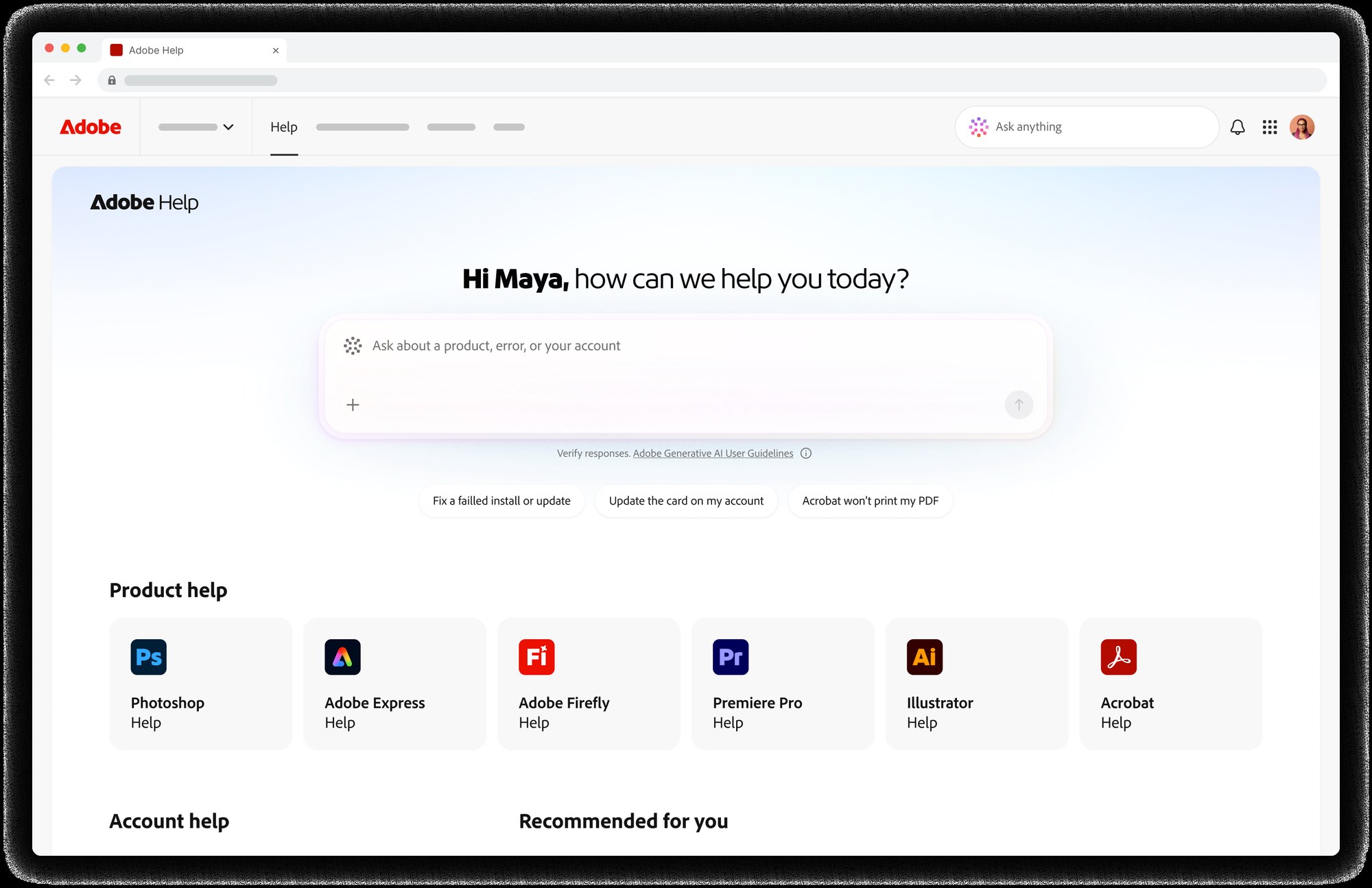
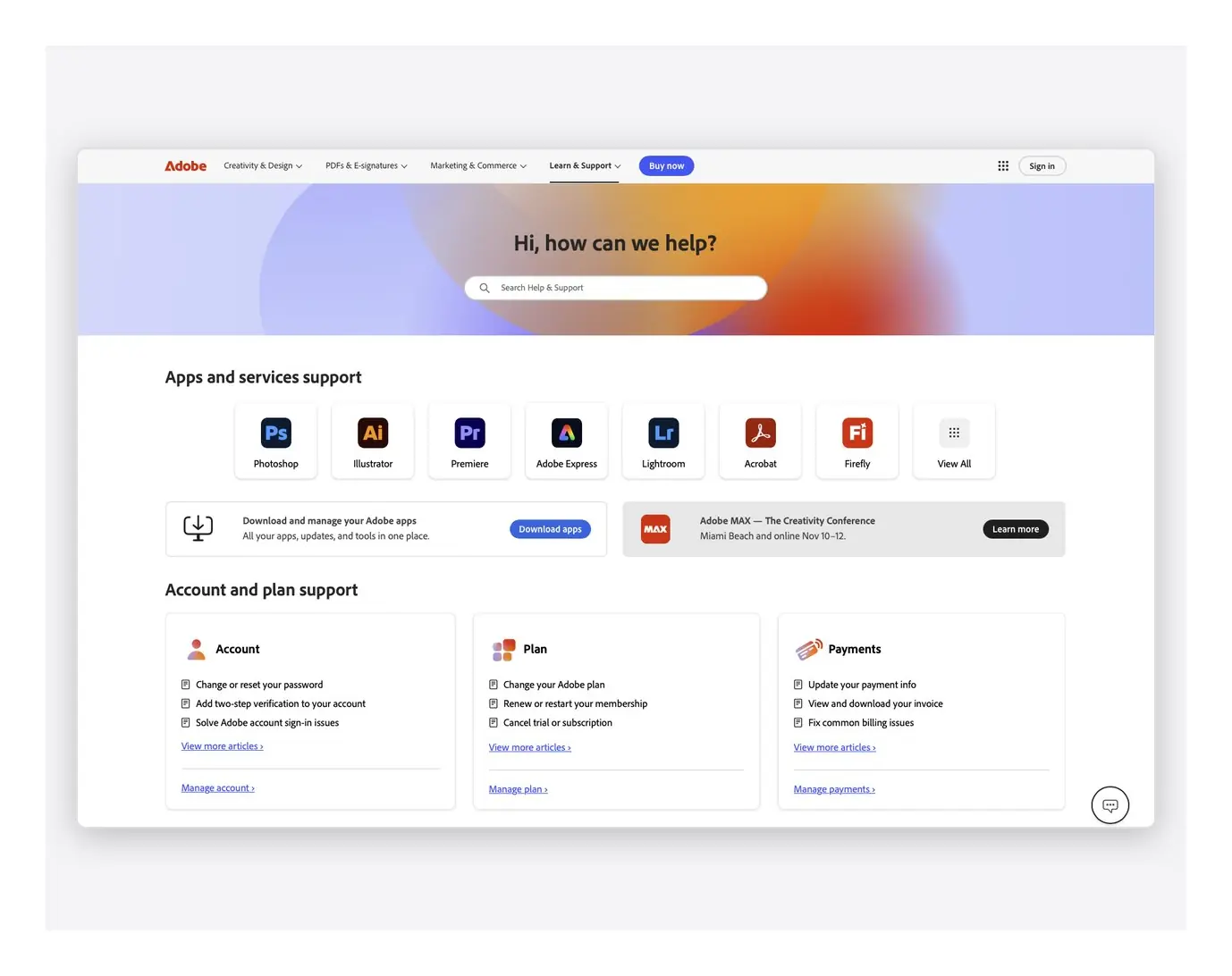
The new Adobe Help home, launched at Adobe MAX 2025
The problem
About half of surveyed visitors said they resolved their issue. Customers increasingly reached Help from inside Adobe’s apps and from AI-generated answers.
What we did
Rebuilt Help around customer tasks through a phased rollout, culminating in the new Help experience and AI answers at Adobe MAX 2025. Invested in three connected areas: rebuilt content, grounded AI answers, and an aligned organization.
Results
60%+ adoption in target segments, 6.5M+ AI answers in six months, and a measured 40% self-resolution baseline. $8M+ annualized new ARR and multi-million retained ARR.
Role
Director of Product, Help Platform and AI Support Tools, November 2019–2026
Owned
Strategy, roadmap, and portfolio priorities
Team
Up to 27, with 7 direct reports (5 people managers)
Partners
Engineering leadership across four workstreams, content, operations, analytics

The problem

Finding an article didn’t mean solving the problem

Customers were reaching Help from new places. Search visits were falling by millions a year, links inside Adobe’s apps had become Help’s largest source of traffic, and more search questions ended in an AI-generated answer.

Help was still built to publish documentation, and its measures focused on cost and deflection. A customer could find the right article and still be stuck, reading a long page to begin fixing an error they hit inside the product.

250M+
unique users a year
400M+
annual visits
About half
of surveyed visitors said they resolved their issue
Visitor survey
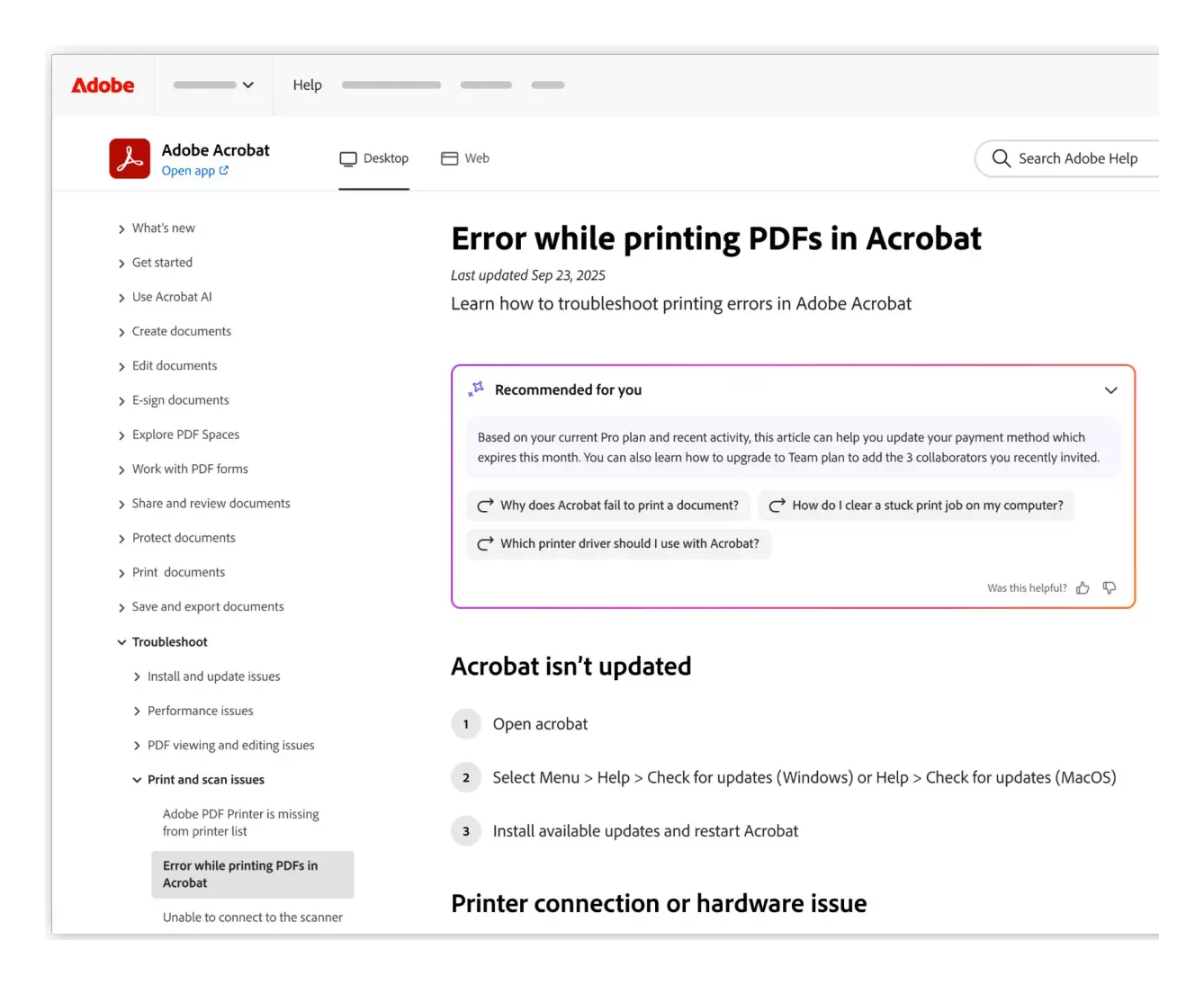
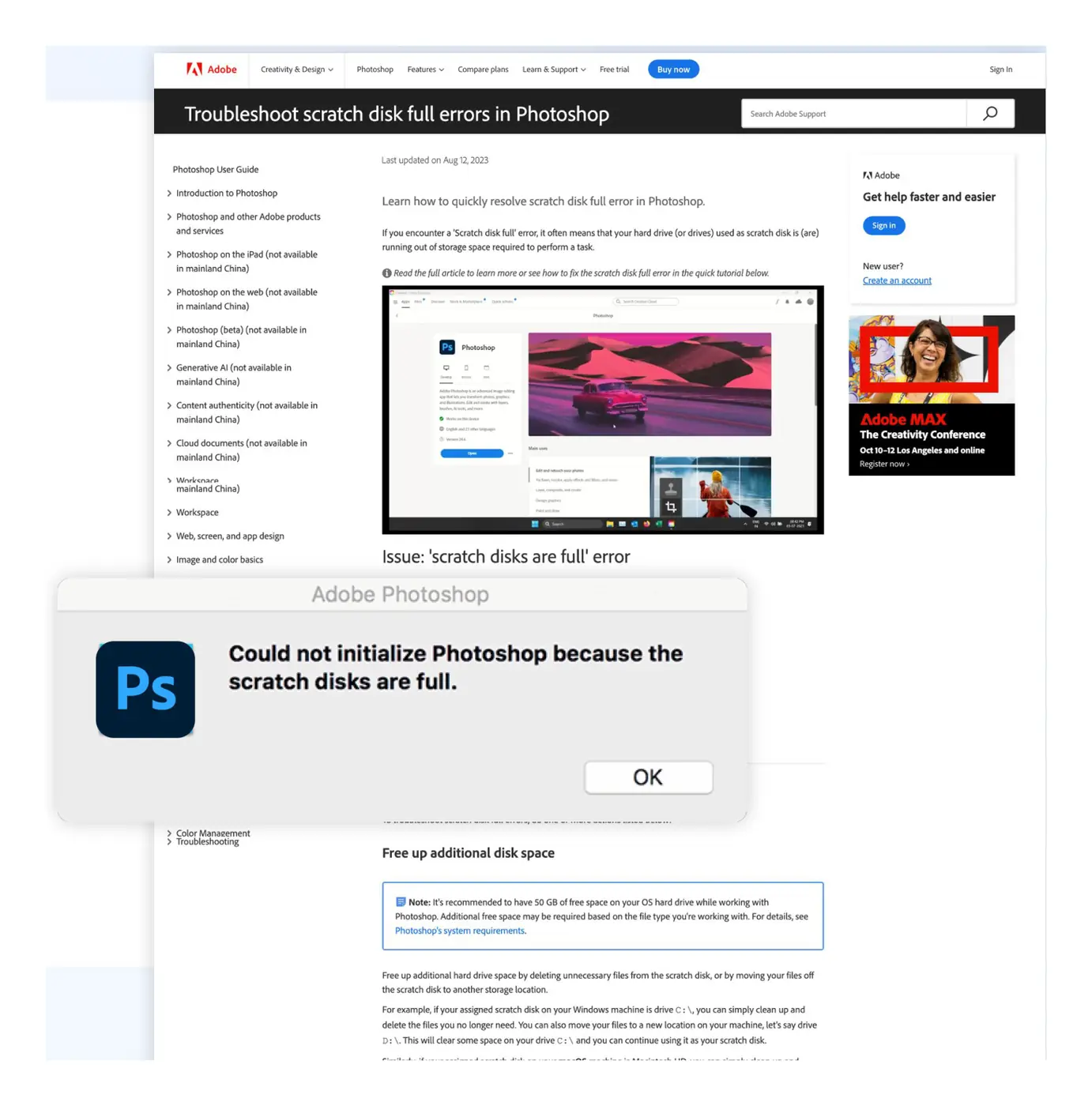
Mockup: a Photoshop scratch disk error beside the long help article a customer must read to start fixing it
A Photoshop scratch disk error beside the article a customer had to read to start fixing it. Design: Shruthi Chandra, Kate Lampe, and the Adobe Help design team.

The product direction

Make resolution the goal

I proposed rebuilding Help around what customers were trying to do. The goal was resolution: a customer who leaves Help with the problem solved.

How we measured it

The measures caught up in two steps. From 2023, product engagement was Help’s primary measure, with support contacts as the guardrail, and the rebuild launched against those measures at Adobe MAX 2025. In 2026, self-resolution became the primary measure, and we began measuring it directly.

The 2026 scorecard, shown here, gave product, content, engineering, operations, and analytics one definition of success.

North star
Self-resolution rate
Did the customer solve their issue without requiring Support intervention?
Increase
Guardrail
Support conversation requests
Are customers who could self-resolve still reaching support?
Decrease
Secondary
Share of AI citations
Are Adobe answers cited on AI surfaces we do not control?
Increase
How the strategy evolved

How the purpose of Help, and the measures used to judge it, changed over six years.

  1. 2020
    Documentation
    Cost and deflection
  2. 2023
    Task-first answers
    Engagement and task success
  3. 2026 direction
    Resolution
    Self-resolution and retained value

What we invested in

Three connected investments

Each investment depended on the others. AI answers drew on the rebuilt content, and the content work needed every partner team. The same measures applied to all three.

Investment

Rebuild the content

Every article was organized around one customer task, with task navigation, numbered steps, and a way into the product. We migrated Help to these templates, added schema.org structured data so search engines and AI assistants could read each task, and retired thousands of older articles as part of managing the collection over time.

My decision: hold the rewriting standard

Moving old articles into new templates would have carried old problems onto a cleaner site. I required every migrated article to be rewritten around one task. Peers agreed with the direction but worried about capacity. I held the standard; contractor funding and a structured content repository, which let us automate parts of the rewrite, made it workable.

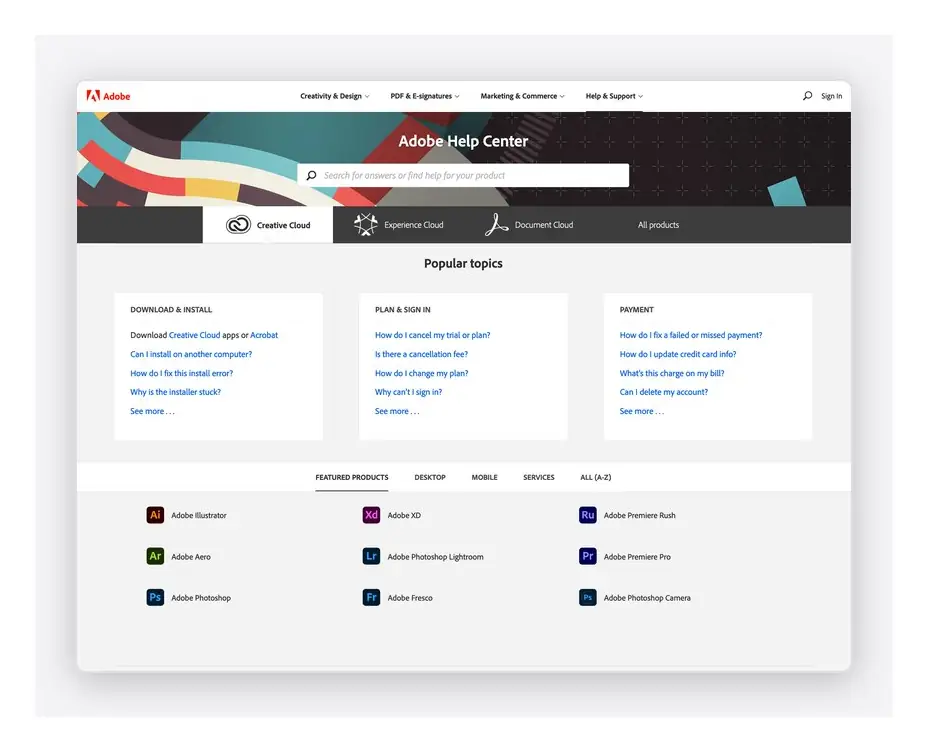
Before

The legacy Adobe Help Center
Shipped The legacy Help Center, organized by product and popular topics.

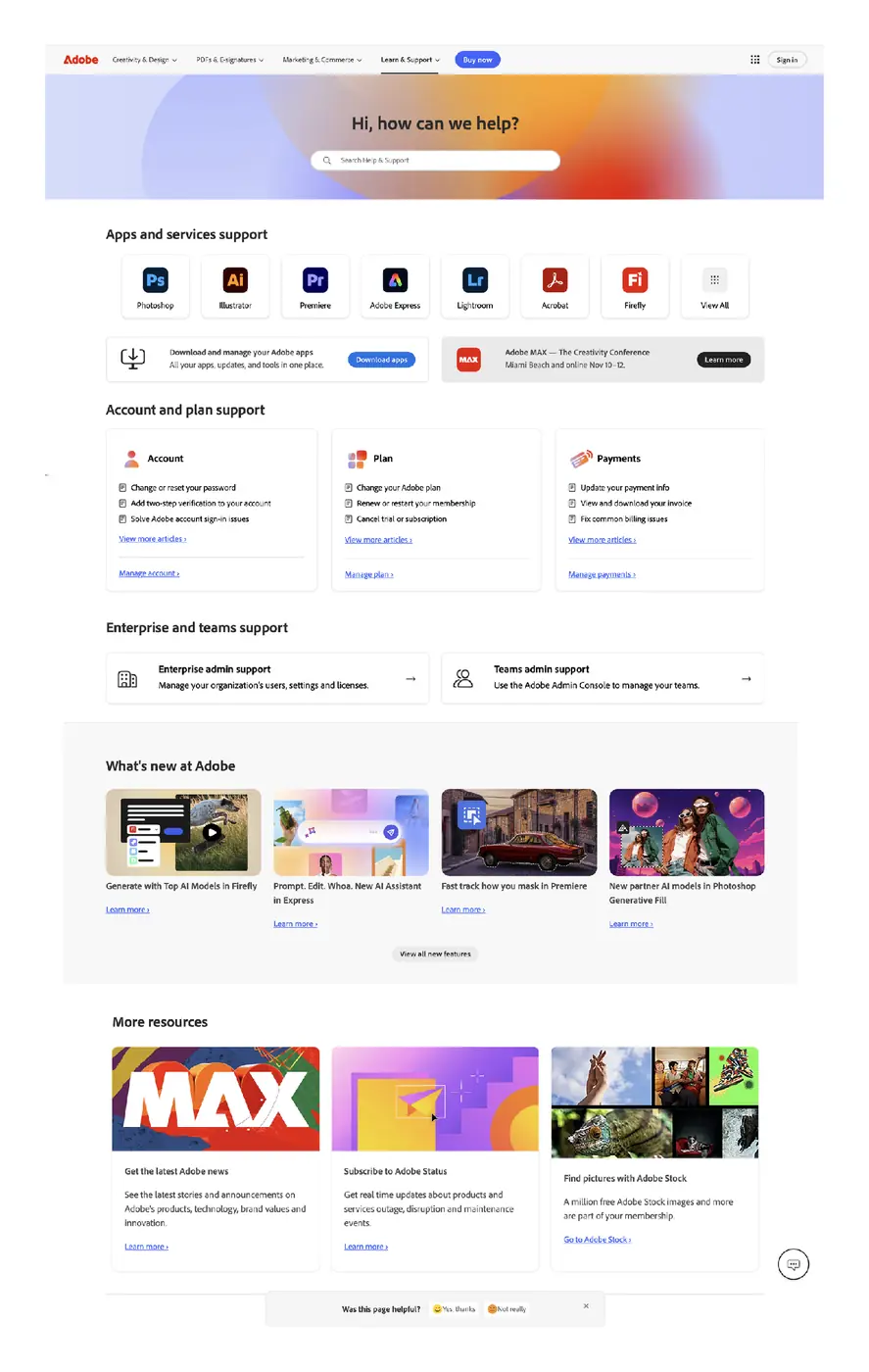
After

The rebuilt Adobe Help home page
Shipped The rebuilt Help home, organized around apps and account tasks, launched at Adobe MAX 2025.

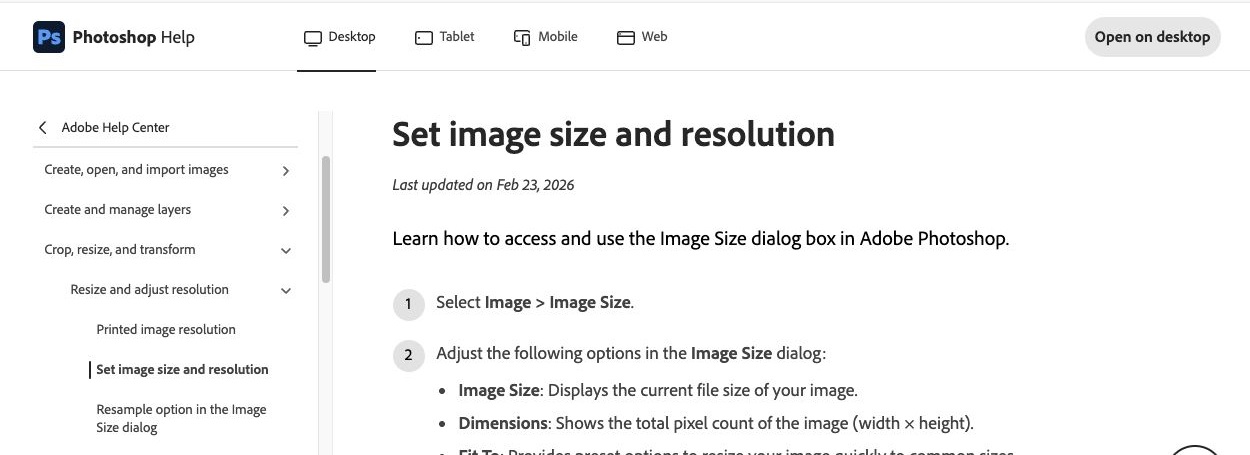
Inside an article

Shipped Photoshop Help article showing left-hand task navigation and numbered image-resizing instructions
Shipped Current article template: task navigation, numbered steps, and structured data. View the live article ↗
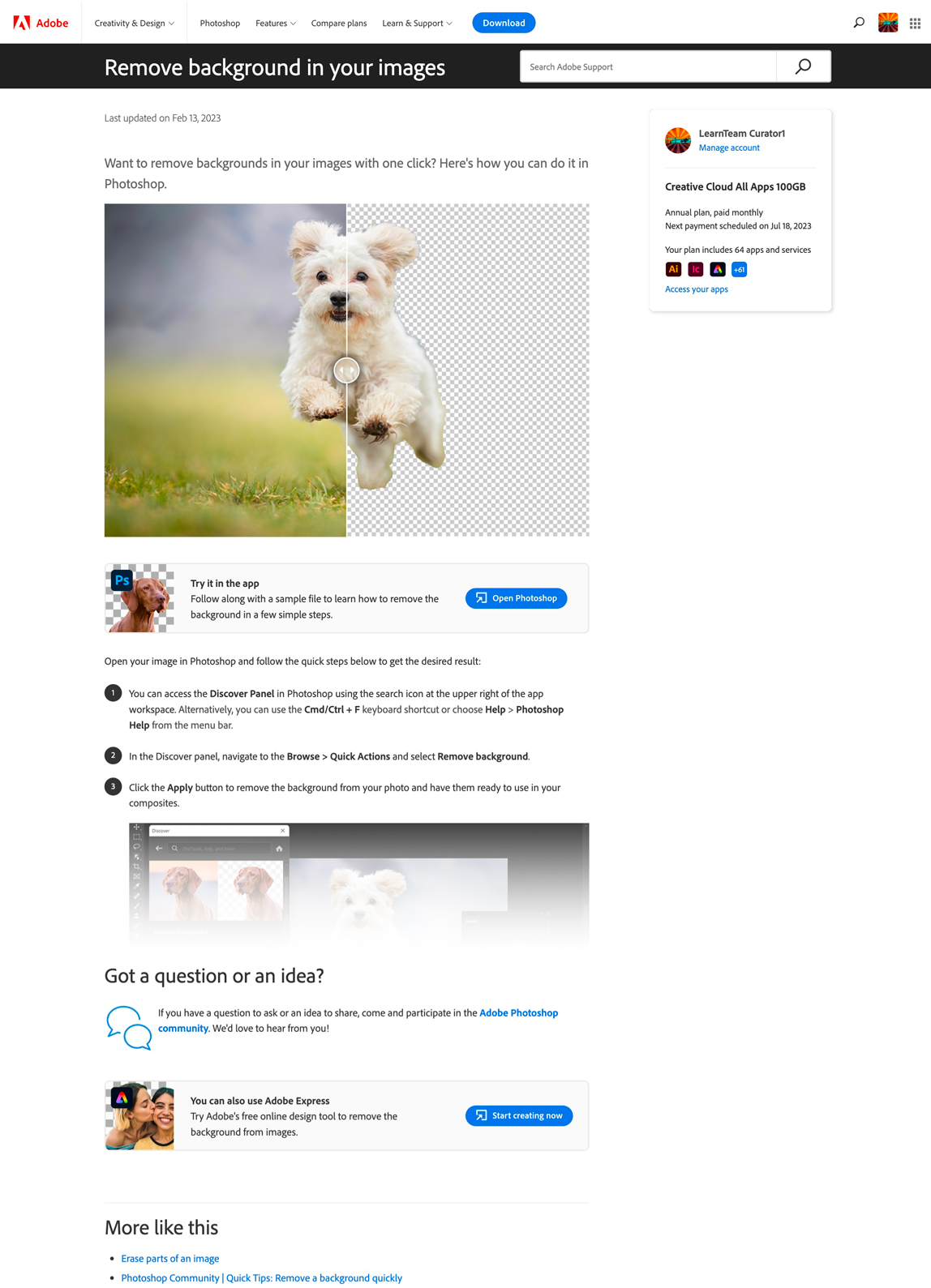
Photoshop help article on removing a background, with an Open Photoshop action, an Adobe Express alternative, and the customer’s plan details
Shipped Task-first article, 2023: one task, an action that opens Photoshop, and the signed-in customer’s plan.

Investment

Deliver grounded answers

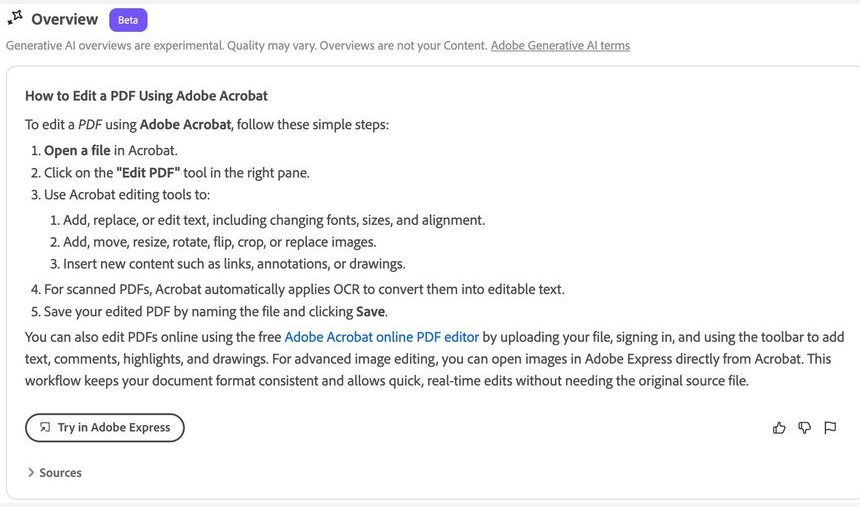
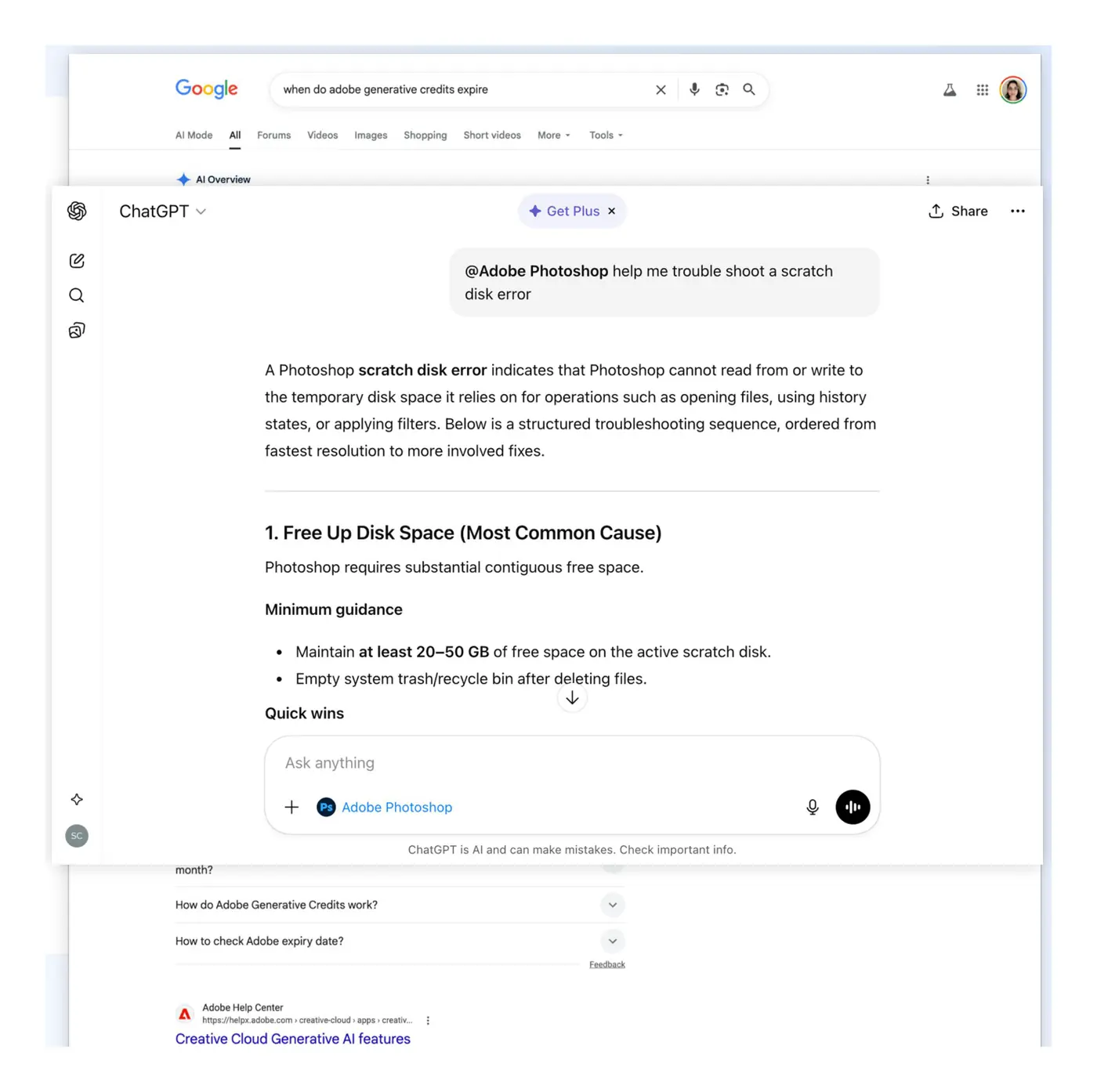
We added AI-generated answers to the top of Help search, grounded in Adobe Help content and protected by guardrails in production. The same structured content let search engines and AI assistants find and cite Help.

AI-generated overview at the top of Adobe Help search, answering how to edit a PDF in Acrobat in numbered steps, with a Try in Adobe Express button, sources, and feedback controls
Shipped An AI-generated overview at the top of Help search: grounded steps, a way into the product, sources, and feedback.

What production taught us

After launch, timeouts, fallback routing, and unsupported questions could all look like the same error. Engineering and partner teams fixed the configuration and routing, and I worked on distinct messages so customers could tell a missing answer from an outage. A plausible answer isn’t enough; quality means grounded, relevant, and useful across the conversation.

Safeguards, applied together

  1. Authoritative content

    Keep the underlying help content accurate and current.

  2. Grounded answers

    Check that each AI-generated answer is supported by that content.

  3. Safeguards across assistants

    Carry those safeguards forward when another assistant uses or rewrites the answer.

Explore the AI launch recovery and answer evaluation

Operating AI in production

A launch exposed gaps we had to address

After launch, timeouts, fallback routing, and unsupported questions could produce similar errors. Engineering and partner teams fixed the endpoint configuration and routing. I worked on the messages so customers could understand what had happened.

Service and routing errors

What happened

Infrastructure timeouts, conflicting fallback routes, and unsupported queries appeared as similar failures to customers.

What we did

Engineering and partner teams corrected endpoint configuration and routing. Production errors declined after the fixes.

Error messages

What happened

A generic error concealed whether the assistant lacked an answer or the service was unavailable.

What we did

I worked on distinct messages for each guardrail response, so customers could tell a missing answer from an outage.

Evaluating answers

What happened

A plausible answer can still be unsupported, incomplete, or unhelpful across a conversation.

What we did

The evaluation team assessed grounding and source relevance alongside accuracy, coherence, repetition, and the customer’s experience.

Recovery and evaluation were shared team efforts.

Investment

Align the organization

My organization owned the platform, templates, authoring tools, analytics, and the engineering backlog. It covered product management, SEO, production, visual communication, and developmental editing, and I led most of it through five people managers.

Peer directors owned the content organization and the rollout, which moved product by product: a Premiere Pro pilot in late 2023, more web apps through 2024, the legacy desktop apps by Adobe MAX 2025, and the long tail in April 2026. Our teams planned against the same measures, so platform work, content migration, and the launch at MAX moved as one program.
My organizationUp to 27

People at peak. Seven direct reports, five of them people managers. Product managers, writers, editors, designers, and web producers.

Partner contributors80+

Contributors across Adobe in product and content, engineering, operations, editorial and design, and analytics.

Launch collaborators40+

People from five partner organizations who worked on the launch at Adobe MAX 2025.

My organization and the 80+ partner contributors were separate groups. The 40+ launch collaborators were counted for the Adobe MAX 2025 launch alone, from five partner organizations.

Results and learning

What changed, and how we know

Each result is listed with what it measures and where it came from.

Customer behavior and self-service

Baseline
40%
visitor self-resolution rate
Baseline for subsequent improvement, measured from 2026
Adoption
60%+
adoption of the rebuilt Help experience within target segments
Rebuilt content and templates
Usage
6.5M+
AI answers displayed in six months
Answers displayed in Help search
Behavior
~50%
fewer users clicking through to Help articles from search
Since AI answers appeared at the top of Help search

Adoption, answers displayed, and click-through show how customers used the new experience. Self-resolution is the measure of whether their problem was solved.

What we learned

Relevance beat volume. General recommendations drew little engagement; help tied to a specific problem performed better. That is why the rebuild went deep on real customer tasks.

Search and AI discovery

External measure
+99%
US searches where Google AI Overviews cite Adobe Help, in one year
Semrush, US database, helpx.adobe.com, Sept. 2025 to Sept. 2026
External measure
40,266
US search keywords with an AI Overview citing Adobe Help, up from 20,241
Same source and period

What we learned

Over the same year, estimated organic search traffic to Adobe Help fell 24%. Being the cited source began to matter more than ranking for a click.

Business value

$8M+
annualized new recurring revenue (ARR) from purchases made through Help
New revenue
Multi-million
annualized retained ARR from the rebuilt Help experience
Measured with the growth team’s product engagement models
+4%
average lift in desktop app launches
From personalization experiments with signed-in visitors

Measurement context

Three sources: purchases made through Help, the growth team’s product engagement models, and personalization experiments with signed-in visitors.

Explore the experiment readouts

What testing changed

What our experiments showed

We tested recommendations, personalized account help, and shorter answers. General recommendations attracted little engagement. Help tied to a specific problem was more promising.

General recommendations

Finding

Machine-learning recommendations on product and article pages showed little or no engagement.

What we prioritized

Content tied to the customer’s task and the product they were using.

Personalized account help

Finding

The personalized subscription card test showed flat overall support-contact rates. A targeted payment-error treatment showed more promise for self-service.

What we prioritized

Specific account problems, each with an action the customer could take.

Faster paths to an answer

Finding

Several shorter-content and faster-answer tests reduced support conversations or improved positive ratings.

What we prioritized

Shorter answers in task-first Help, with continued testing of whether customers resolved their issues.

Adobe Help experiment readouts.

Explore the search and AI content evidence

Search and AI discovery

A content strategy for customers, search, and AI

Customers increasingly encountered Adobe Help through in-app links, search, and AI-generated answers. We needed reliable, task-focused content that could support all three. That meant changing how we structured, published, and maintained it.

Task-first article templates

Migrated the site to a consistent article experience with left-hand navigation and clear task instructions.

Structured content

Added schema.org markup to article pages. The Photoshop article shown above identifies the task, five steps, product, and publisher.

Content lifecycle management

Retired thousands of older articles as part of managing the Help content collection over time.

Visible to customers

Product navigation places the task in context. Numbered instructions guide the customer through it.

Readable by machines

The current Photoshop article shown above includes HowTo, HowToStep, and BreadcrumbList schema, linked to Photoshop and Adobe as the publisher.

Future vision · Not shipped

Help that knows the customer’s situation

Everything in this section is future work: in development, prototyped, or planned. The goal: more customers resolve issues on their own, and fewer need to contact support.

Prototype

Same question, different answer

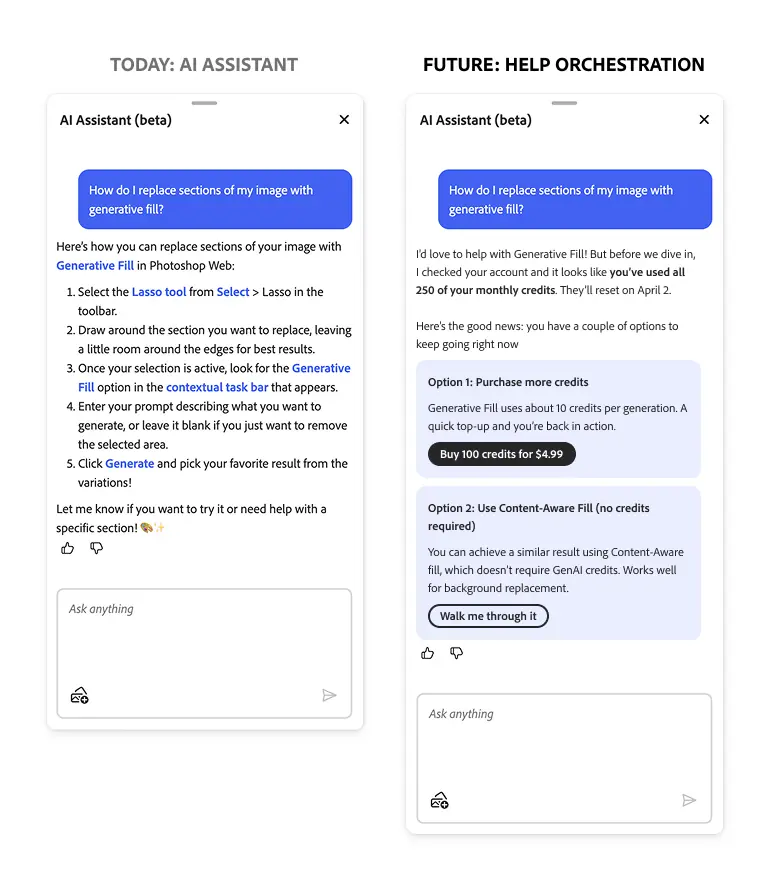
A designer asks the in-app assistant how to replace part of an image with generative AI. She has used all 250 of her monthly credits.

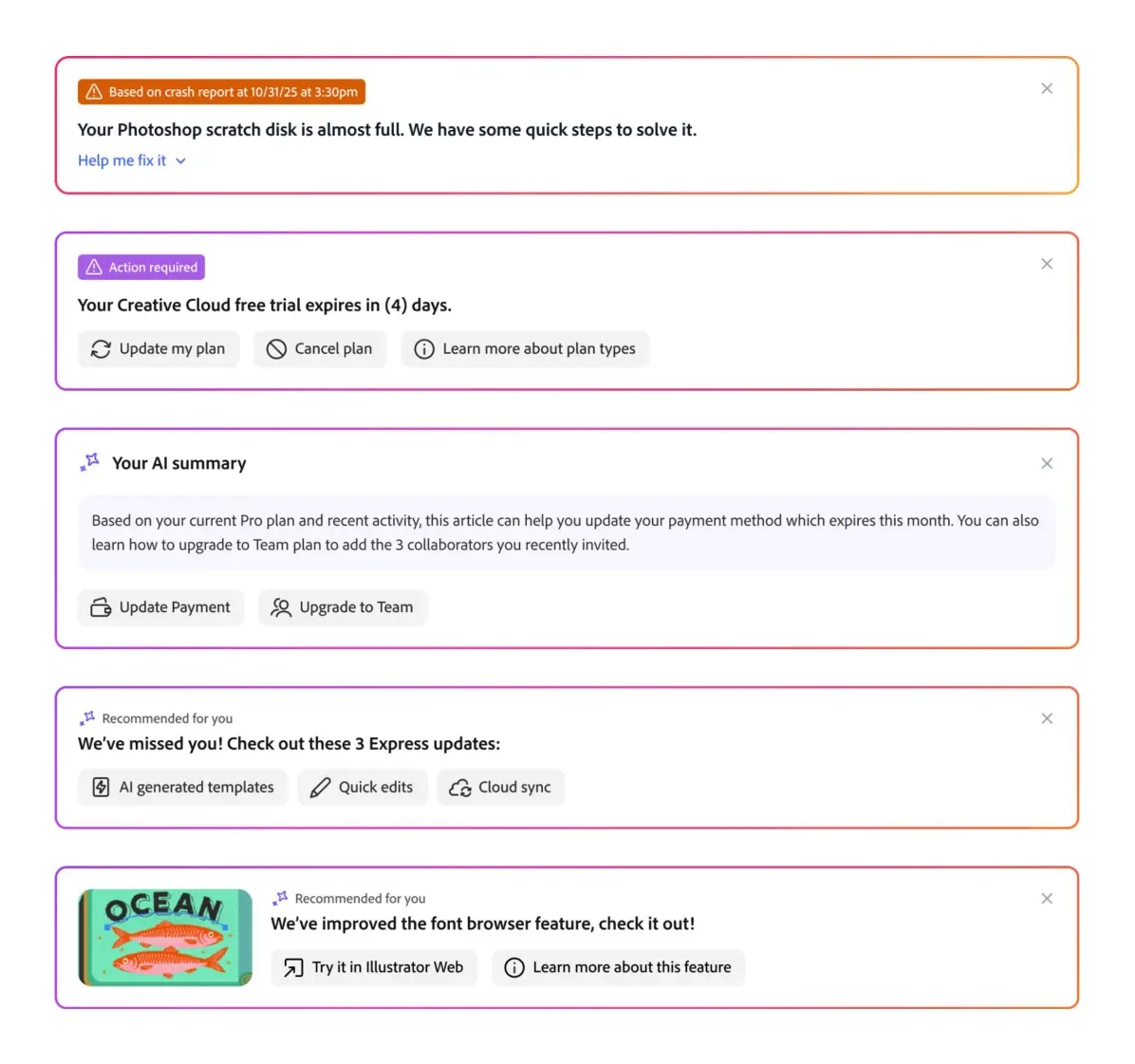
Today’s assistant gives correct instructions she can’t use. In the prototype, the assistant checks her account, finds the blocker, and offers options that work: buy credits, or use Content-Aware Fill.

“The answer was right. It just wasn’t right for her.”
Prototype: today’s assistant answer next to the agent-first answer
Today’s answer beside the prototype answer. Sample account.

Connected capabilities

These capabilities work together, in whatever order a problem needs. Many conversations end with an answer or guidance; an automated action is one option among several.

In development

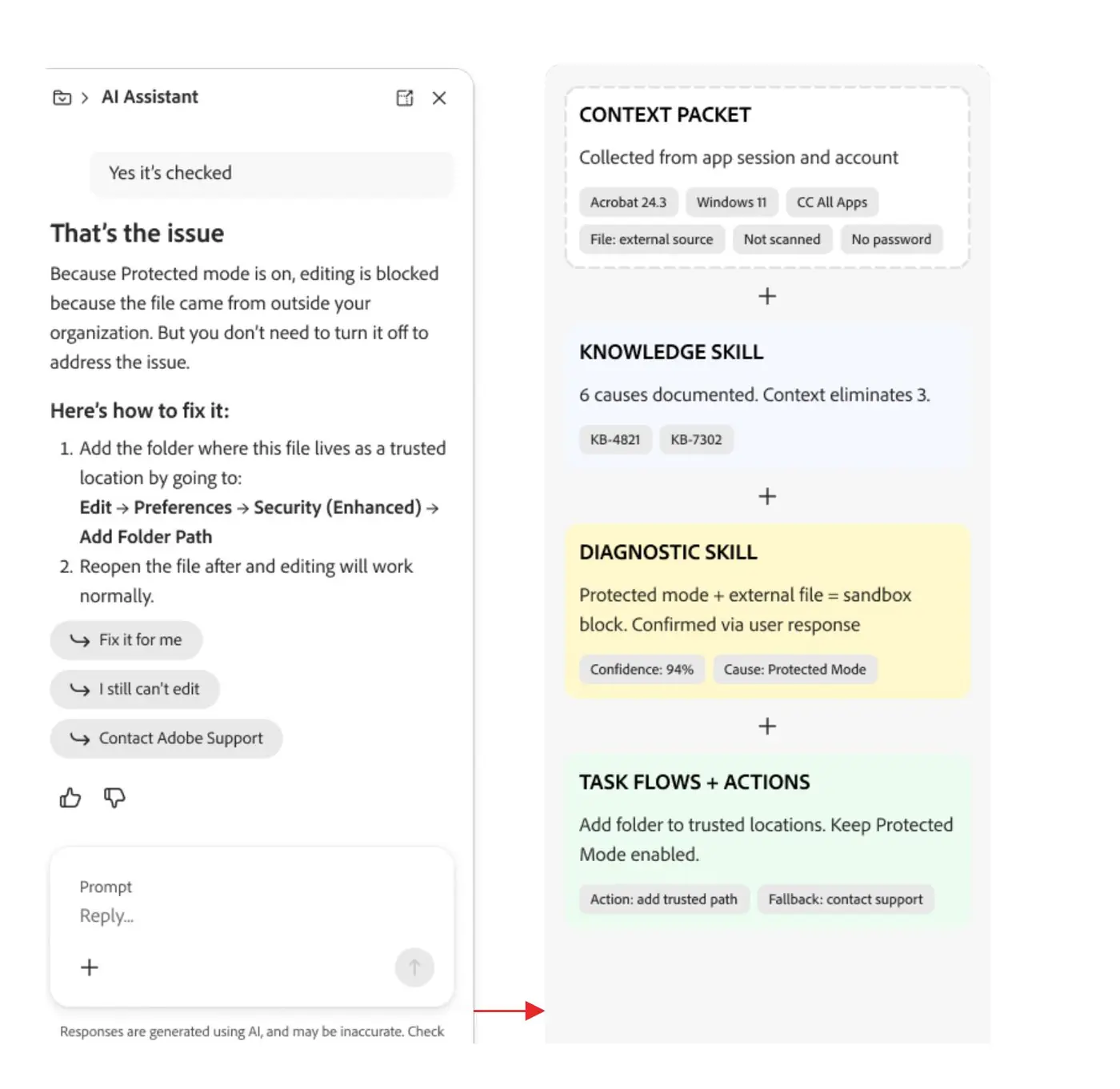
Understand context

See the customer’s app, version, plan, and history before they type, starting with the most common account and product issues.

Customer context for the help assistant: app, version, plan, and history
Prototype

Diagnose the blocker

Use that context to find what is actually stopping the customer, as in the scenario above.

Prototype

Guide or act with confirmation

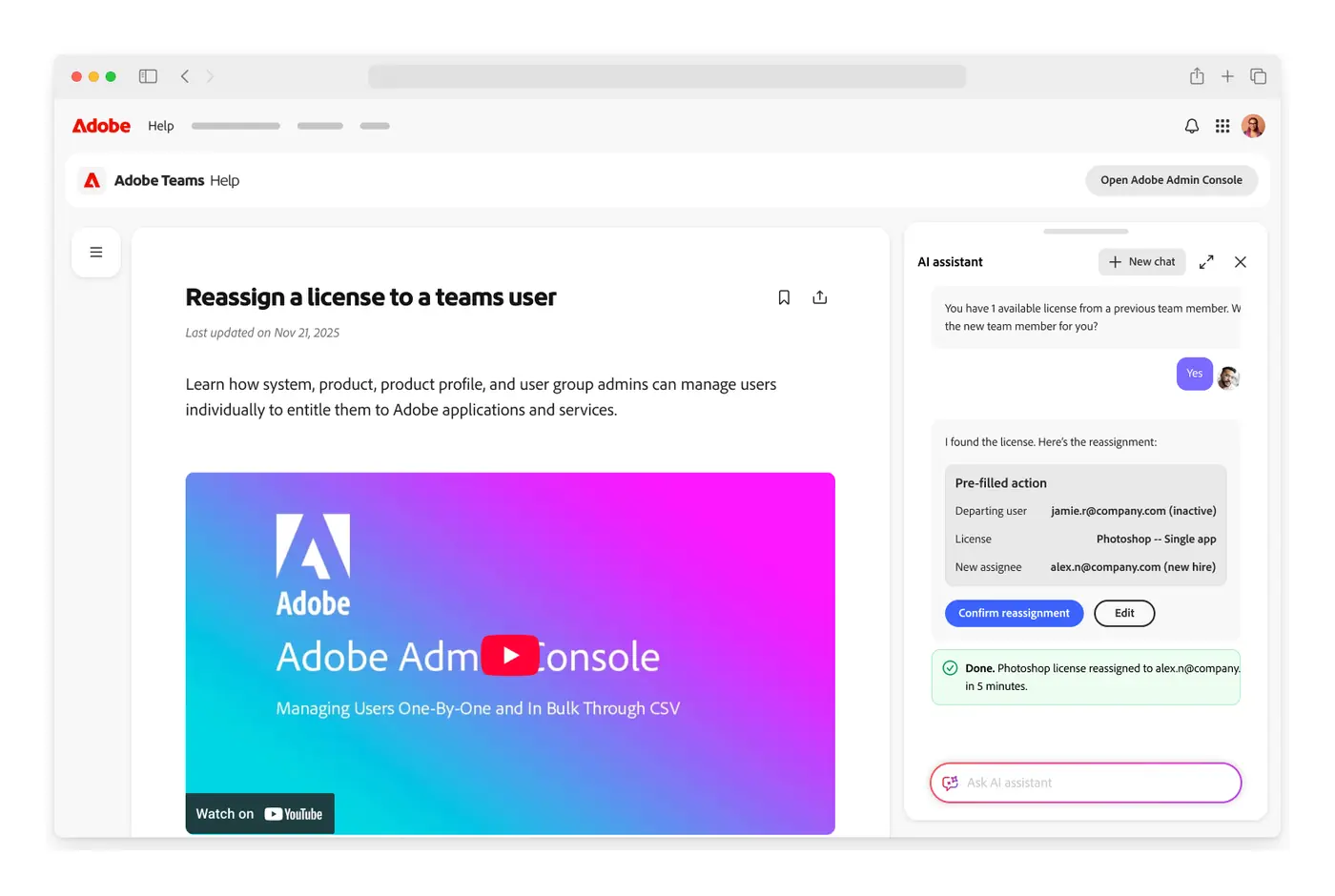
Most problems need clear guidance. Where an action helps, prepare it and let the customer confirm, such as reassigning a license from inside the help page.

Prototype: reassigning a license from inside a help page
Planned

Confirm resolution

Check whether the problem was solved, and feed that into self-resolution measurement.

Planned

When self-service can’t resolve it: hand off to support

Pass the issue and the customer’s context to support, so nobody has to start over.

Prototype design: Shruthi Chandra, Kate Lampe, and the Adobe Help design team.

Explore more vision prototypes
Explore the proposed architecture and roadmap

Proposed architecture: one help service behind every entry point

Customer entry points

Adobe.com · Adobe Home · Creative Cloud desktop app · Adobe Help

Shared routing and customer context

Connect each entry point to the same help service.

How-to answers

Guidance grounded in help content, matched to the product version.

Troubleshooting

Use customer context to diagnose the problem and suggest a fix.

Support handoff

Pass the issue and customer context to support.

Account and product actions

Carry out a change after the customer confirms it.

Proposed architecture. Entry points connect through shared routing and customer context to the same help service.

Proposed roadmap: Foundation, Scale, Sustain

Proposed investment sequencing for a multi-year plan, separate from the timeline of shipped work. Later phases build on capabilities from earlier ones.

Foundation
Know the customer, diagnose the problem
  • Context-aware help assistant, extending the existing AI answer service
  • Context layer: identity, entitlements, version, history
  • Troubleshooting service, a new capability
  • Self-resolution measurement
Scale
Take action and reach every surface
  • Services that carry out account and product actions
  • Support handoff with the customer’s full context
  • In-app assistants connected to the shared help service
  • Generative engine optimization across help, learning, and community content
Sustain
Stay right as products change
  • AI analysis of support insights and self-correcting knowledge
  • Automated content lifecycle
  • AI co-authoring for coverage and quality

The team

The Adobe Help team

The product managers, writers, editors, designers, and web producers in my organization. They rewrote and migrated the articles, designed the new Help home and the vision prototypes, and worked with engineering, operations, and analytics partners on the launch.

  • Jack
  • Neetu
  • Wayne
  • Parul
  • Parichay
  • Mehak
  • Kate K.
  • Erin
  • Rich
  • Kate
  • Dharini